
I Built an AI Search Visibility Agent. Here's What Happened. (2/of 2)

Updated: Sep 1

In Part 1 of this series, I wrote about why the search landscape is shifting and why most agencies, even good ones, are not yet equipped to help their clients navigate the move toward AI-mediated search.
This post is about what I did about it.
I built a Search Visibility Agent: a Python-based AI tool that crawls a website, evaluates its technical health, scores its readiness to be cited by AI answer engines, and generates a set of actionable outputs. It includes content briefs and suggested page rewrites.
I built it using Microsoft 365's agent-building capabilities. I am not a developer. I have no formal software engineering background. What I do have is a clear sense of what the problem is, a willingness to work through it iteratively, and access to AI tools that made the technical side achievable.
Here is how it works, what it produces, and what went wrong.
Why I Built It Myself
The short answer: because nothing else was doing it.
The established SEO tools (SEMrush, Ahrefs, Moz, Screaming Frog) are excellent at what they were designed for. But as I described in Part 1, they were built for a world of ten blue links. They do not measure AI Overview inclusion. They do not score answer-readiness. They do not tell you whether Perplexity would cite your page or ignore it.
And the agencies I had worked with were not filling that gap. The conversation I had with the Stockholm agency's SEO lead, where a direct question about AI search visibility drifted back to keyword rankings and domain authority, made it clear that the expertise simply was not there yet. Not because the people were not smart, but because the field had not caught up.
So I decided to build a tool that picks up where the existing stack stops.
The agent does not replace SEMrush. It picks up where SEMrush stops.
Getting Started: The Perplexity API
One of the first practical steps in building the agent was integrating Perplexity as a data source. Perplexity is one of the most transparent AI search platforms; it explicitly cites every source it uses, which makes it particularly valuable for understanding how AI systems evaluate and select content.
To use Perplexity programmatically, I had to sign up for a Perplexity account, navigate to their developer settings, and generate a secret API key. That key is what allows the agent to query Perplexity directly: sending it questions and receiving structured responses that include citation data.
It sounds straightforward, and in principle it is. But for anyone who has not done this before, the process of creating API credentials, storing them securely in a .env file, and connecting them to a Python script is a meaningful step. It is the moment the project stops being theoretical and starts being a real piece of software talking to real external services.
That moment, when the agent sent its first query to Perplexity and got a real response back, was one of the more satisfying points in the whole build.
How the Agent Is Structured
The agent is built as a modular Python project. At the top level, agent.py acts as the orchestrator; it coordinates the sequence of operations and passes data between modules. All the analytical work lives inside a modules/ folder, and all the results are written to an outputs/ folder.
Here is what each module does:
site_crawler.py : The entry point for the entire analysis pipeline. The crawler systematically visits every accessible page on the target website, collecting URLs, page content, metadata, and structural information. It respects crawl limits and robots.txt conventions. Without an accurate crawl, nothing else works correctly — a lesson learned the hard way, as I'll describe below.
technical_health.py : Evaluates the technical foundations of the website against SEO and AI-readiness criteria. It checks meta titles and descriptions, heading structure (H1/H2/H3 hierarchy), schema markup, image alt text, canonical tags, and other signals that both search engines and AI systems use to understand and trust a page. Produces a health score out of 100, normalized against the number of pages analyzed.
answer_readiness.py : This is where the agent moves beyond traditional SEO into AI-specific territory. It evaluates how well the website's content is structured to be retrieved and cited by AI answer engines. It looks at whether content is written in a clear, self-contained, question-and-answer format; whether key facts are easy to extract; and whether content is specific and authoritative enough to be trusted as a source.
ai_search_gap.py : Identifies the specific gaps between what the website currently offers and what AI search platforms are looking for. It cross-references the site's content against the types of queries and answer formats that AI systems favour, surfacing the areas where the site is most likely to be overlooked or passed over in favor of a competitor.
brief_generator.py : Translates the gap analysis into actionable content briefs. For each identified gap, it produces a structured brief that outlines what a new or updated piece of content should cover, how it should be structured, and what questions it should answer, all optimized for AI citation.
rewrite_engine.py : Takes existing pages that are underperforming on AI readiness and generates suggested rewrites. These are not cosmetic edits — they restructure the content to be more extractable, more clearly authoritative, and more likely to be cited by AI systems.
report_generator.py :Transforms the raw analysis data into human-readable reports. Produces both a summary overview and a detailed page-by-page breakdown, with prioritised recommendations and score breakdowns by module.
What the Agent Actually Produces
This is the part I want to spend some time on, because it is the most practically useful section of this post.
When the agent runs, it writes its results to an outputs/ folder. I initially only opened the audit report, which is genuinely useful, but there is significantly more in there. Here is what each output file contains and why it matters:
audit_report.html (The Visual Dashboard): This is the file I opened first, and it is the most immediately accessible output. It is an HTML file you open in any browser, and it presents the full analysis in a readable, structured format: overall visibility score, technical health score, answer readiness score, and a page-by-page breakdown of issues found.
Think of it as the executive summary (see below summarized screenshot.) It is designed to give you — or a client, or a colleague — a clear picture of where the site stands without requiring you to read JSON files. If you only look at one output, this is the one. But it is not the only one worth looking at.
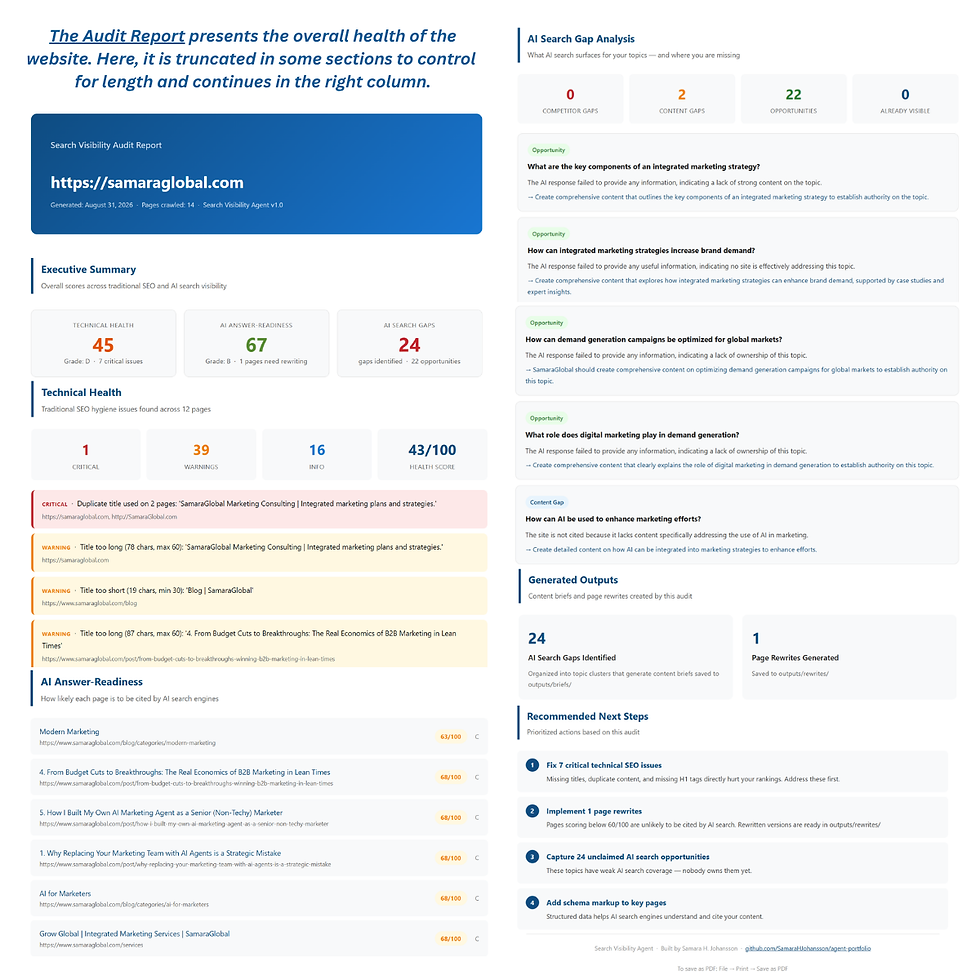
technical_health.json (The Technical Findings): This file contains the raw technical health data for every page the crawler analysed. For each page, it records what was found and what was missing: meta descriptions, title tags, H1 structure, schema markup, image alt text, canonical tags, and more.
It is more granular than the audit report and is the file to go to when you want to understand exactly which pages have which issues. If you are handing off a remediation task to a developer or content team, this is the reference document.
answer_readiness.json (The AI Readiness Scores): This is one of the most distinctive outputs — the one that goes beyond what any standard SEO tool produces. For each page, it scores how well the content is structured for AI citation: whether it answers questions directly, whether key facts are clearly stated, whether the content is self-contained enough to be extracted and quoted.
Low scores here are a signal that the content, even if technically sound, is not written in a way that AI systems can easily use. This is often the most actionable finding for content teams.
ai_search_gaps.json (Where You're Being Overlooked): This file identifies the specific topics, question types, and content formats where the site is likely to be passed over by AI search platforms in favor of competitors. It is the gap analysis and produces a list of opportunities the site is currently missing.
For a marketer, this is strategic gold. It tells you not just what is wrong with the current site, but what content you should be creating next. The Index Report shows a list of titles that address the gaps that were identified. For my own website, SamaraGlobal.com, see here:

briefs_summary.json + outputs/briefs/ (Content Briefs): Based on the gap analysis, the agent generates content briefs: structured outlines for new or updated content that would improve AI visibility. The briefs_summary.json file gives an overview of all briefs generated, while the outputs/briefs/ folder contains the individual brief files.
Each brief specifies the topic, the target questions to answer, the recommended structure, and the key points to cover. They are designed to be handed directly to a writer or used as a prompt for AI-assisted content creation.

outputs/rewrites/ (Suggested Page Rewrites): For pages that score poorly on answer readiness, the rewrite engine generates suggested rewrites. These are not minor edits; they restructure the content to be more extractable, more clearly authoritative, and more likely to be cited. This is the most ambitious output, and also the one that requires the most human judgement before implementation.
The rewrites are a starting point, not a finished product. But they give you a concrete sense of what "AI-optimized content" actually looks like in practice (which is often more useful than a theoretical description.)
crawl_data.json (The Raw Crawl): This is the foundational data file. It is the complete record of everything the crawler found. Every URL visited, every piece of metadata collected, every page structure observed. It is the input that feeds every other module.
Most users will not need to open this file directly. But it is worth knowing it exists, because it is the ground truth for the entire analysis. If something looks wrong in any other output, this is where you start investigating.
It Worked, and Then It Didn't: Tales in Debugging
One of the biggest lessons from building this agent was discovering that getting an AI system to run is very different from getting it to run correctly.
The Great One-Page Website Problem
The first major issue appeared when I tested the agent on my own website. At first glance, everything seemed to work. The crawl completed, reports were generated, and scores were calculated.
There was just one problem.
The crawler was only analyzing a single page: the homepage.
That meant the agent was not actually evaluating the website. It was evaluating one page and assuming it represented the entire site. Every downstream module — the Technical Health Checker, the Answer Readiness Scorer, the Report Generator — was working with the same incomplete dataset.
The challenge was that nothing crashed. The agent appeared to be functioning normally, which made the bug harder to spot. There were no error messages. The outputs looked plausible. It was only when I looked closely at the crawl data and noticed that only one URL had been collected that the problem became clear.
The fix required tracing the flow of data through multiple modules. We discovered that the crawler was not capturing and preserving the full set of discovered pages correctly; it was finding links on the homepage but not following them. The reporting modules were therefore inheriting that incomplete crawl data and treating it as complete.
After debugging and updating several components, the crawler was finally able to complete a full crawl of the site. Instead of analyzing only the homepage, the agent successfully collected and assessed all twelve pages available within the crawl limits.
That one fix immediately improved every report the system produced because the reports were finally based on the whole website rather than a tiny fraction of it.
The Mystery of the Zero Health Score
Once the crawler was working properly, another problem emerged.
The Technical Health Checker was assigning a health score of 0 out of 100.
As the creator of the website, I knew it was not perfect. I built it myself on Wix with no formal web development training. But a score of zero suggested the site was catastrophically broken, which did not seem right.
We started by examining the scoring logic and quickly discovered that the health score was applying penalties too aggressively. Every issue the checker found removed points from the score, and because issues were counted page by page, the deductions accumulated rapidly.
A site with multiple missing meta descriptions, several title tag warnings, missing schema markup, image accessibility issues, and other common SEO observations could quickly lose more than 100 points. The score would then be forced down to zero.
The scoring system was not measuring overall health. It was counting every issue and stacking penalties indefinitely.
To fix this, we redesigned the calculation so that penalties were normalized against the number of pages being analysed. Instead of punishing every individual issue equally, the score became proportional to the size of the website. After the change, the technical score increased from 0/100 to 43/100.
Was the Website Really Bad?
At that point we faced an interesting question: was the scoring system still wrong, or was the website genuinely carrying a large number of technical issues? To find out, we added debugging output that showed exactly what the checker was finding.
The results were surprisingly useful. According to the Audit Report (see below the summarized image) the agent identified:
Missing meta descriptions
Duplicate titles
Duplicate meta descriptions
Missing schema markup
Missing image alt text
Thin content pages
Multiple H1 headings on every page
That last finding was particularly interesting. Every page appeared to contain multiple H1 headings. Further investigation showed that some site-wide contact and footer content in my Wix template was being rendered as H1 tags across the entire website.
In other words, the agent was not inventing problems. It had surfaced a genuine technical issue that I had never noticed; one that would be invisible to a casual visitor but meaningful to both search engines and AI systems trying to understand the structure of the page.
A Valuable Turning Point
The most important outcome of these debugging sessions was not simply fixing bugs.
It was reaching the point where the conversation shifted from: "Why is the agent broken?" to "Are these findings actually useful?"
By the end of the process, the crawler was successfully analyzing the full site, the scoring system was behaving more realistically, and the reports were producing actionable insights. For me, that was the moment the project crossed an important threshold. The Search Visibility Agent stopped feeling like an experiment and started behaving like a tool that could genuinely help marketers understand how visible their websites are to both search engines and AI systems.
What Building The Search Visibility Agent Taught Me
Building this agent taught me something far more important than Python, APIs, or debugging. It demonstrated just how quickly the gap is widening between traditional search optimization and the emerging reality of AI-mediated discovery. A year ago, I would have assumed that understanding this shift required a team of developers and a significant software budget. Instead, it turned out to be something a marketer could explore directly, provided they were willing to ask questions, make mistakes, and keep iterating.
The Search Visibility Agent is not finished. In many ways, it is just beginning. The scoring models will evolve, new AI platforms will emerge, and the definition of "visibility" will continue to change. But that is precisely the point. Waiting for the industry to produce a finished answer is no longer a strategy.
The businesses that thrive in the next phase of search will be the ones that start learning now: not just how to rank, but how to become a source that AI systems trust, understand, and choose to cite. This project began as an experiment to answer a simple question: "How visible is a website to AI?" It ended by convincing me that this may become one of the most important marketing questions of the next decade.
--
You can follow the build and see the full code on GitHub. And if you are a marketer wondering what this kind of analysis could reveal about your own website, I would be glad to talk.
A note on accessibility. In its current form, the Search Visibility Agent requires Python, a code editor, and API keys — including a Perplexity API key — to run. It is built for technically curious users who are comfortable in a development environment. If that is not you, that is completely fine. The outputs in this post speak for themselves, and the concepts in Part 1 apply regardless of whether you ever run the code. A version that anyone can use from a browser, by simply entering their URL, is on the roadmap. That is where this is heading.
Follow the build: github.com/SamaraHJohansson/agent-portfolio
This is Part 2 of a two-part series. If you missed it, read: Part 1: "The Search Game Has Changed. Most Agencies Haven't."
--
Samara H. Johansson is a senior B2B marketing consultant specializing in developing and then activating global brand positioning, messaging frameworks, and AI-augmented marketing strategy to generate leads. She works with companies navigating growth, repositioning, and international market expansion. Learn more at SamaraGlobal.com and subscribe to The AI-Augmented Marketer on LinkedIn.



Comments